Installation
Complete setup guide for the AGIRAILS SDK.

By the end of this guide, you'll have:
- Installed the AGIRAILS SDK
- Configured your development environment
- Obtained ETH and USDC (testnet or mainnet)
- Verified everything works
Time required: 10 minutes
Quick Reference
| Component | Requirement |
|---|---|
| Node.js | 16+ |
| TypeScript | 5.2+ (recommended) |
| ethers.js | v6 (auto-installed) |
| Python | 3.9+ (AGIRAILS Python SDK) |
| Network | Base Mainnet or Base Sepolia |
Step 1: Install SDK
TypeScript SDK v2.5.0 on npm · Python SDK v2.3.0 on PyPI — mainnet live, security audit complete.
npm install @agirails/sdk
Install AGIRAILS Python SDK from PyPI:
pip install agirails
See Quick Start for Python snippets.
AGIRAILS SDK uses ethers.js v6. If migrating from v5:
ethers.utils.parseUnits()→ethers.parseUnits()orparseUnits()ethers.utils.formatUnits()→ethers.formatUnits()orformatUnits()new ethers.providers.JsonRpcProvider()→new ethers.JsonRpcProvider()- See ethers v6 migration guide
From Source (Optional)
- TypeScript
- Python
For development or latest features:
git clone https://github.com/agirails/sdk-js.git
cd sdk-js
npm install && npm run build && npm link
Then in your project:
npm link @agirails/sdk
For development or latest features:
git clone https://github.com/agirails/sdk-python.git
cd sdk-python
pip install -e .
Step 2: Configure TypeScript
Add to tsconfig.json:
{
  "compilerOptions": {
    "target": "ES2020",
    "module": "commonjs",
    "lib": ["ES2020"],
    "moduleResolution": "node",
    "esModuleInterop": true,
    "strict": true,
    "skipLibCheck": true,
    "resolveJsonModule": true
  }
}
Step 3: Wallet Setup
Generate an encrypted keystore (one-time):
# Testnet
ACTP_KEY_PASSWORD=your-password actp init -m testnet

# Mainnet
ACTP_KEY_PASSWORD=your-password actp init -m mainnet
This creates .actp/keystore.json with a new wallet. The SDK auto-detects it at startup.
Create .env:
# Password to decrypt your keystore
ACTP_KEY_PASSWORD=your-password

# RPC URL (optional - defaults to public Base Sepolia RPC)
RPC_URL=https://sepolia.base.org
Never commit your keystore or passwords to version control.
.env
.env.local
.actp/
If ACTP_PRIVATE_KEY is set, it takes priority over keystore auto-detection. This supports existing setups that pass a raw private key.
Load in your code:
import 'dotenv/config';
Step 4: Get Tokens
Option A: Testnet (Recommended for Development)
Get Base Sepolia ETH
ETH is required for gas fees:
- Visit Coinbase Faucet
- Connect your wallet
- Request Base Sepolia ETH
- Wait ~30 seconds
Get Mock USDC
Mint mock USDC tokens:
- TypeScript
- Python
import { ethers, parseUnits } from 'ethers';
import 'dotenv/config';

const provider = new ethers.JsonRpcProvider('https://sepolia.base.org');
const wallet = new ethers.Wallet(process.env.PRIVATE_KEY!, provider);

const usdc = new ethers.Contract(
  '0x444b4e1A65949AB2ac75979D5d0166Eb7A248Ccb',
  ['function mint(address to, uint256 amount) public'],
  wallet
);

// Mint 1000 USDC (6 decimals for USDC)
const tx = await usdc.mint(wallet.address, parseUnits('1000', 6));
await tx.wait();
console.log('Minted 1000 USDC');
import asyncio
import os
from dotenv import load_dotenv
from eth_account import Account
from web3 import Web3

load_dotenv()

async def mint_usdc():
    w3 = Web3(Web3.HTTPProvider("https://sepolia.base.org"))
    account = Account.from_key(os.environ["PRIVATE_KEY"])

    usdc = w3.eth.contract(
        address="0x444b4e1A65949AB2ac75979D5d0166Eb7A248Ccb",
        abi=[{"name": "mint", "type": "function", "inputs": [
            {"name": "to", "type": "address"},
            {"name": "amount", "type": "uint256"}
        ]}]
    )

    tx = usdc.functions.mint(account.address, 1_000 * 1_000_000).build_transaction({
        "from": account.address,
        "nonce": w3.eth.get_transaction_count(account.address),
        "gas": 120_000,
        "gasPrice": w3.eth.gas_price,
    })
    signed = account.sign_transaction(tx)
    tx_hash = w3.eth.send_raw_transaction(signed.rawTransaction)
    w3.eth.wait_for_transaction_receipt(tx_hash)
    print("Minted 1000 USDC:", tx_hash.hex())

if __name__ == "__main__":
    asyncio.run(mint_usdc())
If the Mock USDC contract doesn't have a public mint, contact us on Discord.
Option B: Mainnet (Production)
Smart contracts passed security audit (Feb 2026). No transaction limits.
Get Base Mainnet ETH
ETH is required for gas fees (~$0.001 per transaction):
- Bridge from Ethereum: Base Bridge
- Buy directly: Coinbase, Moonpay
- From another L2: Use Across or Stargate
Get USDC
Real USDC on Base Mainnet:
- Bridge from Ethereum: Base Bridge (native USDC)
- Buy on Coinbase: Transfer USDC directly to Base
- Swap on Base: Uniswap, Aerodrome
USDC Contract: 0x833589fCD6eDb6E08f4c7C32D4f71b54bdA02913
Step 5: Verify Installation
Test your setup:
- TypeScript
- Python
// Level 1: Standard API - Agent with lifecycle management
import { Agent } from '@agirails/sdk';
import 'dotenv/config';

async function verify() {
  // Create agent to verify setup (auto-detects .actp/keystore.json)
  const agent = new Agent({
    name: 'VerifySetup',
    network: 'testnet',
  });

  // Get balances
  const balances = await agent.getBalances();

  console.log('✓ Wallet:', agent.address);
  console.log('✓ Network: Base Sepolia');
  console.log('✓ ETH balance:', balances.eth, 'ETH');
  console.log('✓ USDC balance:', balances.usdc, 'USDC');
  console.log('\n✅ Setup verified!');
}

verify().catch(e => {
  console.error('Failed:', e.message);
  process.exit(1);
});
# Level 1: Standard API - Agent with lifecycle management
import asyncio
from dotenv import load_dotenv
from agirails import Agent

load_dotenv()

async def verify():
    # Create agent to verify setup (auto-detects .actp/keystore.json)
    agent = Agent(
        name='VerifySetup',
        network='testnet',
    )

    # Get balances
    balances = await agent.get_balances()

    print(f'✓ Wallet: {agent.address}')
    print('✓ Network: Base Sepolia')
    print(f'✓ ETH balance: {balances.eth} ETH')
    print(f'✓ USDC balance: {balances.usdc} USDC')
    print('\n✅ Setup verified!')

if __name__ == '__main__':
    asyncio.run(verify())
Run:
npx ts-node verify-setup.ts
Expected output:
✓ Wallet: 0x742d35Cc6634C0532925a3b844Bc9e7595f12345
✓ Network: Base Sepolia
✓ ETH balance: 0.1 ETH
✓ USDC balance: 1000.0 USDC

✅ Setup verified!
Network Configuration
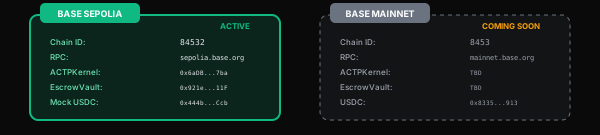
Contract addresses are automatically configured by the SDK based on your network parameter. You never need to hardcode addresses. The links below are for verification and auditing only.
Base Sepolia (Testnet)
| Resource | Value |
|---|---|
| Chain ID | 84532 |
| RPC URL | https://sepolia.base.org |
| Explorer | sepolia.basescan.org |
| Contract | Basescan |
|---|---|
| ACTPKernel | View on Basescan |
| EscrowVault | View on Basescan |
| Mock USDC | View on Basescan |
Base Mainnet (Production)
| Resource | Value |
|---|---|
| Chain ID | 8453 |
| RPC URL | https://mainnet.base.org |
| Explorer | basescan.org |
| Contract | Basescan |
|---|---|
| ACTPKernel | View on Basescan |
| EscrowVault | View on Basescan |
| AgentRegistry | View on Basescan |
| ArchiveTreasury | View on Basescan |
| USDC | View on Basescan |
Troubleshooting
"Cannot find module '@agirails/sdk'"
| Cause | Solution |
|---|---|
| Not installed | Run npm install @agirails/sdk |
| Using local build | Run npm link @agirails/sdk in your project |
| Wrong moduleResolution | Add "moduleResolution": "node" to tsconfig |
"No wallet found" or "Invalid private key"
| Cause | Solution |
|---|---|
| No keystore | Run ACTP_KEY_PASSWORD=pw actp init -m testnet |
| Wrong password | Check ACTP_KEY_PASSWORD in your .env |
| Missing keystore file | Verify .actp/keystore.json exists |
Using ACTP_PRIVATE_KEY with wrong format | Key should be 66 characters (0x + 64 hex) |
| Env not loaded | Add import 'dotenv/config' |
"Network connection failed"
| Cause | Solution |
|---|---|
| RPC down | Try https://base-sepolia.g.alchemy.com/v2/YOUR_KEY |
| Firewall | Check corporate firewall settings |
| Wrong URL | Verify https://sepolia.base.org |
"Insufficient funds for gas"
| Cause | Solution |
|---|---|
| No ETH | Get from Coinbase Faucet |
| Transaction pending | Wait for faucet confirmation (~30s) |
Agent Initialization Options
- TypeScript
- Python
// Level 1: Standard API - Agent with lifecycle management
import { Agent } from '@agirails/sdk';
import 'dotenv/config';

// Minimal — auto-detects .actp/keystore.json
const agent = new Agent({
  name: 'MyAgent',
  network: 'testnet',
});

// With custom RPC
const agentWithRpc = new Agent({
  name: 'MyAgent',
  network: 'testnet',
  rpcUrl: 'https://base-sepolia.g.alchemy.com/v2/YOUR_KEY',
});

// Explicit private key (backward compat)
const agentWithKey = new Agent({
  name: 'MyAgent',
  network: 'testnet',
  wallet: { privateKey: process.env.ACTP_PRIVATE_KEY! },
});

// Mock mode (local development, no blockchain needed)
const mockAgent = new Agent({
  name: 'MockAgent',
  network: 'mock',
});
# Level 1: Standard API - Agent with lifecycle management
import os
from agirails import Agent

# Minimal — auto-detects .actp/keystore.json
agent = Agent(
    name='MyAgent',
    network='testnet',
)

# With custom RPC
agent_with_rpc = Agent(
    name='MyAgent',
    network='testnet',
    rpc_url='https://base-sepolia.g.alchemy.com/v2/YOUR_KEY',
)

# Explicit private key (backward compat)
agent_with_key = Agent(
    name='MyAgent',
    network='testnet',
    wallet={'private_key': os.environ['ACTP_PRIVATE_KEY']},
)

# Mock mode (local development, no blockchain needed)
mock_agent = Agent(
    name='MockAgent',
    network='mock',
)
'testnet'- Base Sepolia (development)'mainnet'- Base Mainnet (production)'mock'- Local development, no blockchain needed
Next Steps
🚀 Start Building
- Quick Start - First transaction
- Provider Agent - Get paid
- Consumer Agent - Request services
📚 Learn More
- Core Concepts - How AGIRAILS works
- SDK Reference - Full API docs
- Contract Reference - On-chain API
Need help? Join our Discord